为了对cellpose微调模型在测试数据集上的效果进行评估,在Grok的帮助下弄了一个小工具。
这个评估工具能够读取cellpose保存的npy文件,然后随机抽取指定数量的结构展示mask给专家遍历,然后由专家评估正确与否。专家遍历完成后自动计算正确率。专家的评估记录自动记录到csv表格文件中。而且这个工具还支持断点继续。具体使用效果如下:
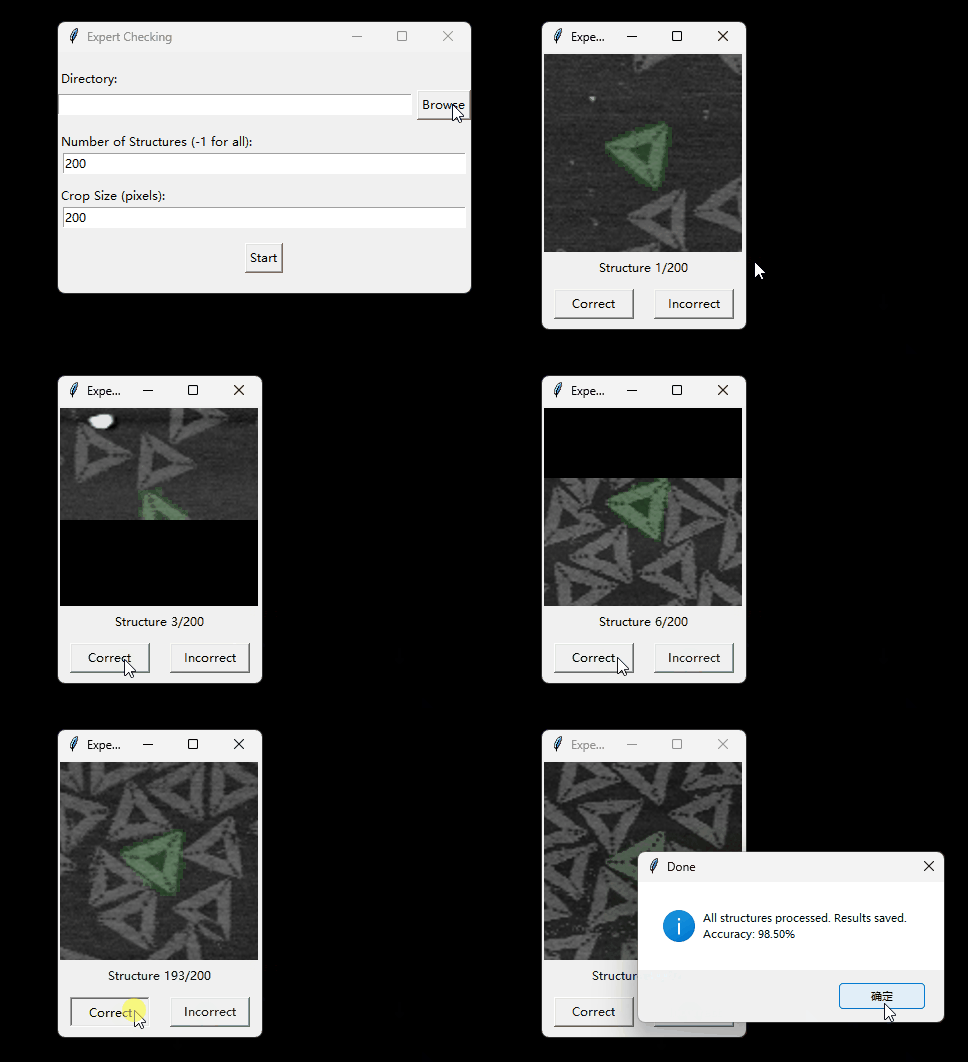
完整代码如下:
import osfrom glob import globimport numpy as npimport tkinter as tkfrom tkinter import messagebox, ttk, filedialogimport randomfrom PIL import Image, ImageTkimport csvimport jsonfrom scipy.ndimage import center_of_mass
# 默认参数DEFAULT_NUM_STRUCTURES = 200 # 默认检查200个结构DEFAULT_CROP_SIZE = 200 # 默认裁剪区域大小(像素)CONFIG_FILE = 'config.json' # 配置文件名
class LabelingApp: def __init__(self, root): self.root = root self.root.title("Expert Checking") self.results = [] self.num_structures = DEFAULT_NUM_STRUCTURES self.crop_size = DEFAULT_CROP_SIZE self.directory = None # 无默认目录 self.structures = [] self.current_structure_idx = 0 self.current_image = None self.current_mask = None self.current_label = None self.current_file = None
# 加载已有结果 self.load_existing_results()
# 检查是否有配置文件 config_path = os.path.join(os.getcwd(), CONFIG_FILE) # 默认检查当前工作目录 if os.path.exists(config_path): try: self.load_config(config_path) if not self.directory or not os.path.isdir(self.directory): raise ValueError("Invalid directory in config") self.load_existing_results() # 重新加载结果以确保使用配置中的目录 self.label_frame = tk.Frame(root) self.canvas = tk.Canvas(self.label_frame, width=self.crop_size, height=self.crop_size) self.canvas.pack() self.label_var = tk.StringVar() self.label_var.set("Structure 0/0") tk.Label(self.label_frame, textvariable=self.label_var).pack() # 按钮框架用于居中对齐 button_frame = tk.Frame(self.label_frame) button_frame.pack(pady=10) tk.Button(button_frame, text="Correct", command=self.label_correct, width=10).pack(side=tk.LEFT, padx=10, fill=tk.X, expand=True) tk.Button(button_frame, text="Incorrect", command=self.label_incorrect, width=10).pack(side=tk.LEFT, padx=10, fill=tk.X, expand=True) self.label_frame.pack() self.load_structures() except (json.JSONDecodeError, ValueError) as e: messagebox.showerror("Error", f"Invalid config.json or directory: {str(e)}. Please select a directory.") self.show_setup_gui() else: self.show_setup_gui()
def show_setup_gui(self): # GUI 设置窗口,每项配置单独一行 self.setup_frame = tk.Frame(self.root) self.setup_frame.pack(pady=10)
# Directory 输入和选择按钮 dir_frame = tk.Frame(self.setup_frame) dir_frame.pack(fill=tk.X, pady=5) tk.Label(dir_frame, text="Directory:").pack(anchor=tk.W) dir_inner_frame = tk.Frame(dir_frame) dir_inner_frame.pack(fill=tk.X) self.dir_entry = tk.Entry(dir_inner_frame, width=50) self.dir_entry.pack(side=tk.LEFT, fill=tk.X, expand=True, padx=(0, 5)) tk.Button(dir_inner_frame, text="Browse", command=self.browse_directory).pack(side=tk.LEFT)
# Number of Structures 输入 num_frame = tk.Frame(self.setup_frame) num_frame.pack(fill=tk.X, pady=5) tk.Label(num_frame, text="Number of Structures (-1 for all):").pack(anchor=tk.W) self.num_entry = tk.Entry(num_frame, width=50) self.num_entry.insert(0, str(DEFAULT_NUM_STRUCTURES)) self.num_entry.pack(fill=tk.X, padx=5)
# Crop Size 输入 crop_frame = tk.Frame(self.setup_frame) crop_frame.pack(fill=tk.X, pady=5) tk.Label(crop_frame, text="Crop Size (pixels):").pack(anchor=tk.W) self.crop_entry = tk.Entry(crop_frame, width=50) self.crop_entry.insert(0, str(DEFAULT_CROP_SIZE)) self.crop_entry.pack(fill=tk.X, padx=5)
# Start 按钮 tk.Button(self.setup_frame, text="Start", command=self.start_labeling).pack(pady=10)
def browse_directory(self): # 打开目录选择对话框 directory = filedialog.askdirectory() if directory: self.dir_entry.delete(0, tk.END) self.dir_entry.insert(0, directory)
def load_existing_results(self): # 加载已有CSV文件 self.results = [] if self.directory and os.path.exists(self.directory): csv_path = os.path.join(self.directory, 'labeling_results.csv') if os.path.exists(csv_path): with open(csv_path, 'r', newline='') as csvfile: reader = csv.DictReader(csvfile) for row in reader: self.results.append({ 'file': row['file'], 'structure_id': int(row['structure_id']), 'expert_label': row['expert_label'] == 'True' })
def load_config(self, config_path): # 加载配置文件 with open(config_path, 'r') as f: config = json.load(f) self.directory = config['directory'] self.num_structures = config['num_structures'] self.crop_size = config['crop_size'] self.structures = [(s[0], int(s[1]), s[2], None) for s in config['structures']]
def save_config(self): # 保存配置文件 config = { 'directory': str(self.directory), # 确保字符串 'num_structures': int(self.num_structures), # 确保整数 'crop_size': int(self.crop_size), # 确保整数 'structures': [(str(s[0]), int(s[1]), str(s[2])) for s in self.structures] # 转换为Python原生类型 } config_path = os.path.join(self.directory, CONFIG_FILE) with open(config_path, 'w') as f: json.dump(config, f, indent=2)
def start_labeling(self): try: self.directory = self.dir_entry.get() self.num_structures = int(self.num_entry.get()) self.crop_size = int(self.crop_entry.get()) if not self.directory: raise ValueError("Please select a directory") if self.crop_size <= 0: raise ValueError("Crop size must be positive") if not os.path.isdir(self.directory): raise ValueError("Invalid directory") except ValueError as e: messagebox.showerror("Error", str(e)) return
# 重新加载已有结果以确保使用新选择的目录 self.load_existing_results()
# 调整画布大小并切换到标签窗口 self.setup_frame.pack_forget() self.label_frame = tk.Frame(self.root) self.canvas = tk.Canvas(self.label_frame, width=self.crop_size, height=self.crop_size) self.canvas.pack() self.label_var = tk.StringVar() self.label_var.set("Structure 0/0") tk.Label(self.label_frame, textvariable=self.label_var).pack() # 按钮框架用于居中对齐 button_frame = tk.Frame(self.label_frame) button_frame.pack(pady=10) tk.Button(button_frame, text="Correct", command=self.label_correct, width=10).pack(side=tk.LEFT, padx=10, fill=tk.X, expand=True) tk.Button(button_frame, text="Incorrect", command=self.label_incorrect, width=10).pack(side=tk.LEFT, padx=10, fill=tk.X, expand=True) self.label_frame.pack() self.load_structures()
def load_structures(self): # 获取指定目录下所有npy文件 fps = glob(os.path.join(self.directory, '*.npy')) if not fps: messagebox.showerror("Error", "No .npy files found in the specified directory") self.root.quit() return
# 重置结构列表 self.structures = []
# 收集所有结构 all_structures = [] for fp in fps: try: rec = np.load(fp, allow_pickle=True).item() masks = rec.get('masks') if masks is None: continue # 跳过没有masks的文件 unique_labels = np.unique(masks) structures = [label for label in unique_labels if label != 0] for label in structures: all_structures.append((fp, label, rec.get('filename', ''), masks)) except Exception as e: messagebox.showwarning("Warning", f"Error loading {fp}: {str(e)}") continue
if not all_structures: messagebox.showerror("Error", "No valid structures found in .npy files") self.root.quit() return
# 过滤掉已标签的结构 labeled_set = {(r['file'], r['structure_id']) for r in self.results} remaining_structures = [ s for s in all_structures if (s[0], s[1]) not in labeled_set ]
# 随机选择结构 if self.num_structures == -1 or self.num_structures >= len(remaining_structures): self.structures = remaining_structures else: self.structures = random.sample(remaining_structures, self.num_structures) random.shuffle(self.structures)
# 保存配置 self.save_config()
if not self.structures: messagebox.showerror("Error", "No structures available to label after filtering.") self.root.quit() return self.show_structure()
def show_structure(self): if self.current_structure_idx >= len(self.structures): self.save_results() messagebox.showinfo("Done", f"All structures processed. Results saved.\nAccuracy: {self.calculate_accuracy():.2%}") self.root.quit() return
self.current_file, self.current_label, img_path, self.current_mask = self.structures[self.current_structure_idx] try: self.current_image = np.array(Image.open(img_path).convert('RGB')) except FileNotFoundError: messagebox.showwarning("Warning", f"Image file {img_path} not found, skipping.") self.current_structure_idx += 1 self.show_structure() return self.label_var.set(f"Structure {self.current_structure_idx + 1}/{len(self.structures)}")
# 计算结构质心并裁剪 mask = (self.current_mask == self.current_label).astype(np.uint8) centroid_y, centroid_x = center_of_mass(mask) centroid_y, centroid_x = int(centroid_y), int(centroid_x) half_crop = self.crop_size // 2
# 计算裁剪区域 h, w = self.current_mask.shape x_start = centroid_x - half_crop x_end = centroid_x + half_crop y_start = centroid_y - half_crop y_end = centroid_y + half_crop
# 创建全黑背景 cropped_image = np.zeros((self.crop_size, self.crop_size, 3), dtype=np.uint8) cropped_mask = np.zeros((self.crop_size, self.crop_size), dtype=np.uint8)
# 计算图像内的有效裁剪区域 src_x_start = max(0, x_start) src_x_end = min(w, x_end) src_y_start = max(0, y_start) src_y_end = min(h, y_end)
# 计算目标区域的偏移量 dst_x_start = max(0, -x_start) dst_x_end = min(self.crop_size, w - x_start) dst_y_start = max(0, -y_start) dst_y_end = min(self.crop_size, h - y_start)
# 复制有效区域到目标图像 if src_x_end > src_x_start and src_y_end > src_y_start: cropped_image[dst_y_start:dst_y_end, dst_x_start:dst_x_end] = \ self.current_image[src_y_start:src_y_end, src_x_start:src_x_end] cropped_mask[dst_y_start:dst_y_end, dst_x_start:dst_x_end] = \ mask[src_y_start:src_y_end, src_x_start:src_x_end]
# 创建掩码叠加图像,透明度为0.1 mask_rgb = np.stack([cropped_mask * 0, cropped_mask * 255, cropped_mask * 0], axis=-1) # 绿色掩码 overlay = np.clip(cropped_image * 0.9 + mask_rgb * 0.1, 0, 255).astype(np.uint8) img = Image.fromarray(overlay) self.photo = ImageTk.PhotoImage(img) self.canvas.create_image(0, 0, anchor=tk.NW, image=self.photo)
def label_correct(self): self.save_label(True) self.current_structure_idx += 1 self.show_structure()
def label_incorrect(self): self.save_label(False) self.current_structure_idx += 1 self.show_structure()
def save_label(self, expert_label): self.results.append({ 'file': self.current_file, 'structure_id': self.current_label, 'expert_label': expert_label }) # 增量保存到CSV self.save_results()
def calculate_accuracy(self): if not self.results: return 0.0 correct = sum(1 for r in self.results if r['expert_label']) return correct / len(self.results)
def save_results(self): # 保存结果到CSV csv_path = os.path.join(self.directory, 'labeling_results.csv') with open(csv_path, 'w', newline='') as csvfile: fieldnames = ['file', 'structure_id', 'expert_label'] writer = csv.DictWriter(csvfile, fieldnames=fieldnames) writer.writeheader() for result in self.results: writer.writerow(result)
# 主程序if __name__ == "__main__": root = tk.Tk() app = LabelingApp(root) root.mainloop()使用时需要注意的就是运行它的python环境。最好是使用cellpose(目前支持版本为4.0.1)的相同python环境运行该程序,避免对cellpose保存的npy文件读取错误。